 sign up
GET STARTED WITH SETLI
Add New Expense
Add recurring or one-off property expenses, choose where they apply, split costs between tenants and attach invoices with Setli.

01
Enter Expense Details
Enter Expense Details
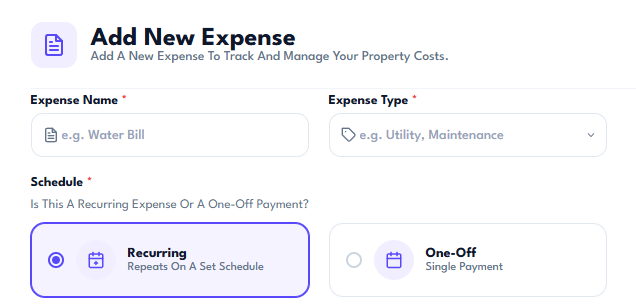
Add the expense name and type, then choose whether it is a recurring expense or a one-off payment.
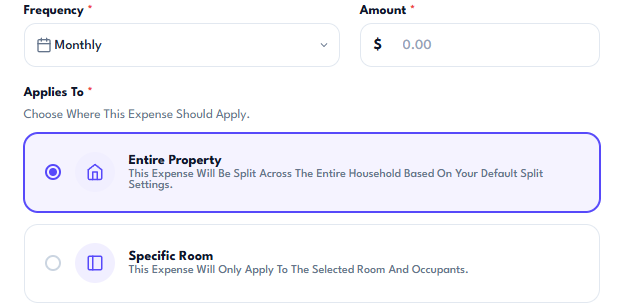
Set the payment frequency and total amount so Setli can create the correct expense schedule.
02
Choose Where It Applies
Choose Where It Applies
Apply the expense across the entire property or assign it to a specific room.
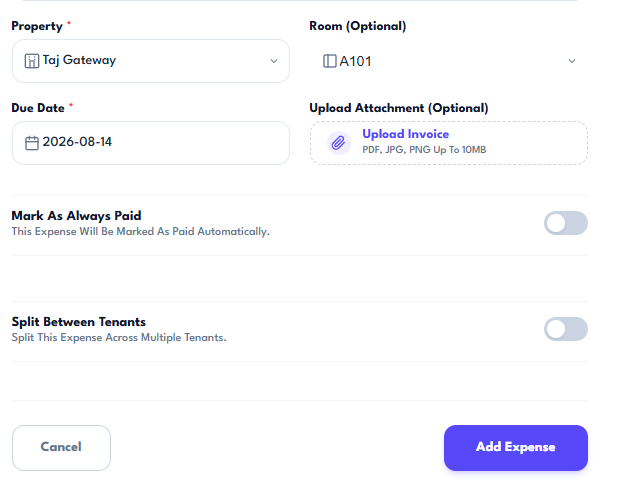
Select the property and room, then set the due date for the payment.
03
Add Supporting Details
Add Supporting Details
Upload an invoice or supporting attachment, choose whether the expense should always be marked as paid and decide whether to split it between tenants.
Review the details and add the expense when everything is correct.