
 sign up
GET STARTED WITH SETLI
Record Offline Payment
Record offline rent or expense payments by linking them to unpaid items, updating payment records and applying Setli’s 3.5% fee to offline rent payments only.

01
Select an Unpaid Item
Select an Unpaid Item
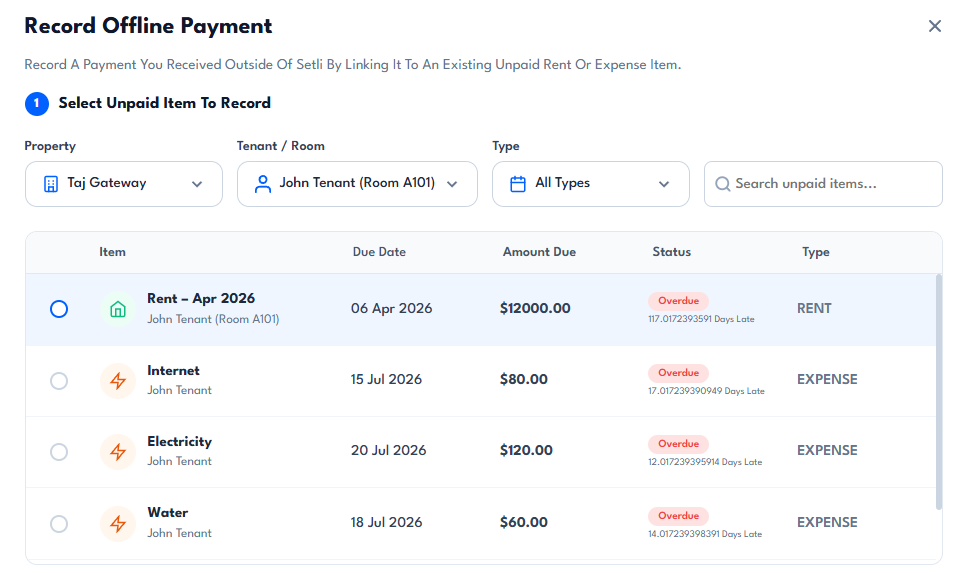
Choose the property, tenant or room, and payment type, then search and select the unpaid rent or expense item you want to record.
Setli displays the unpaid items, due dates, amount due, status and whether the item is rent or an expense.
02
Review Payment Details
Review Payment Details
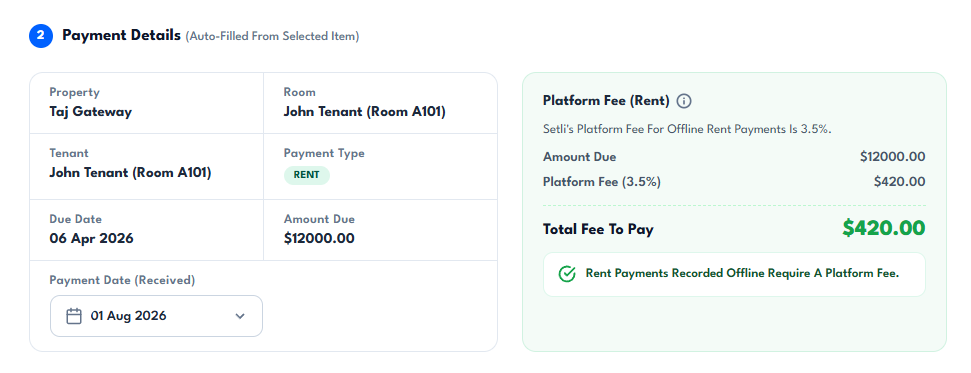
Once an item is selected, Setli auto-fills the property, tenant, payment type, due date and amount due.
Enter the payment date received so the offline payment can be linked to the selected unpaid record correctly.
03
Confirm Fees and Record Payment
Confirm Fees and Record Payment
Offline rent payments is free to use and does not incurr setli's 3.5% platform fee
