
 sign up
Write Off Unpaid Rent and Expenses | Setli
Write off unpaid rent or tenant expenses while retaining complete transaction history, reasons, dates and downloadable records in Setli.

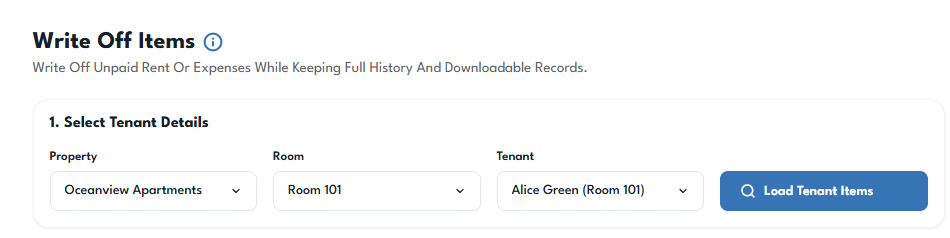
Select the Tenant
Choose the relevant property, room and tenant, then load their unpaid rent and expense items.
This ensures the write-off is applied to the correct tenancy and financial records.
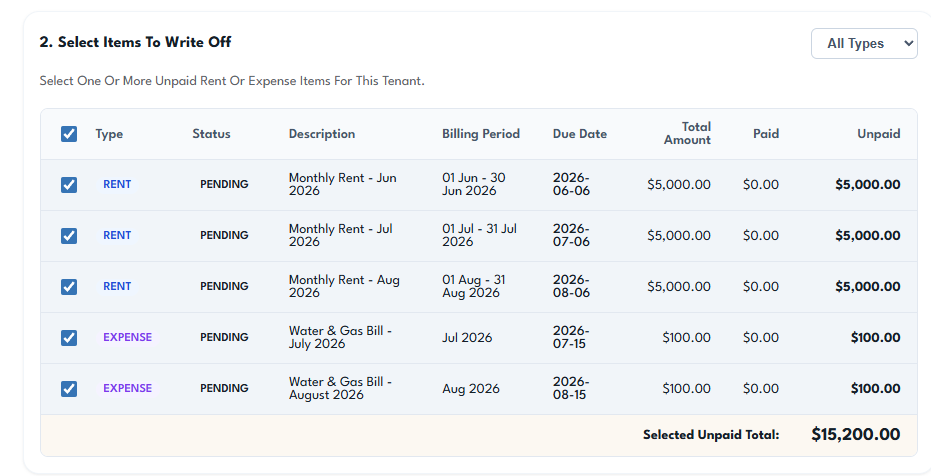
Select Items to Write Off
Review the tenant’s unpaid rent and expense items and select one or multiple records to write off.
Filter the list by rent or expenses and review each item’s:
Billing period
Due date
Total amount
Amount paid
Remaining unpaid balance
Setli calculates the combined unpaid total before you continue.
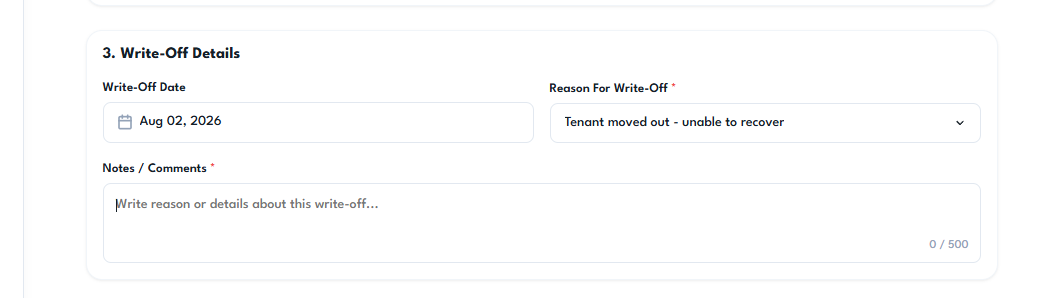
Enter the write-off date, select the reason and provide supporting notes or comments.
Reasons may include:
Tenant moved out
Payment unable to be recovered
Account correction
Disputed charge
Other approved reason
These details remain attached to the written-off records for future reporting and reference.
Review and Confirm
Review the selected items and confirm the write-off.
The amounts are removed from active outstanding balances, but the original transaction history remains available for reporting, tax records and audit purposes.
Written-off items are not deleted and can still be identified within Setli’s financial records.
